
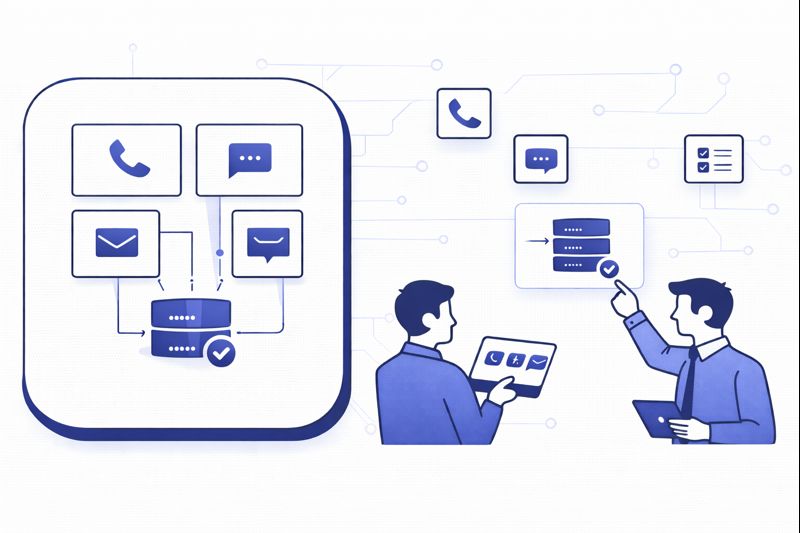
Most “omnichannel” projects still feel like four separate call centers taped together. Customers switch from WhatsApp to phone and have to repeat everything. Agents bounce between five tabs. Reporting is a spreadsheet export stitched together the night before the QBR. In 2026, that model is uncompetitive. This guide walks you through how to design a truly unified contact center stack where voice, chat, WhatsApp and email run on one routing brain, one data layer and one performance model – so every interaction feels like one continuous conversation, not a channel lottery.
1. Why “Omnichannel” Is Still Broken in 2026
Most teams didn’t build omnichannel; they accumulated it. Voice sits on an old PBX, email in a helpdesk, chat in a website widget, WhatsApp in someone’s phone or a separate inbox. Each platform has its own queueing rules and SLAs. Nobody owns the full journey. That’s how you end up with customers messaging on WhatsApp, then calling in and hearing “I don’t see your chat here.” It’s also why leaders struggle to connect CX to churn or revenue, even with “sophisticated” reports and feature-heavy contact center tools.
The second failure pattern is treating channels as cost-saving switches instead of experience levers. Teams push traffic from phone to chat to save minutes but never redesign workflows, routing or playbooks. Agents end up answering phone-style questions in text-only environments without the tools or time to resolve issues. True omnichannel starts by accepting that every channel has strengths, weaknesses and cost profiles – and designing journeys that exploit those differences while using one stack underneath.
2. Define Your Omnichannel Vision Before You Buy Anything
Before choosing software, decide what “great” looks like. Start with three questions: which journeys matter most, which channels make those journeys easier, and what must always stay consistent? For example, you may decide that high-severity support always offers voice as an option, order tracking primarily lives in chat/WhatsApp, and renewals get proactive email plus outbound calls. This is where you align business goals with channels instead of letting vendor roadmaps dictate your CX.
Write this down as a one-page “omnichannel charter”: top five journeys, preferred channels, non-negotiable response times and escalation rules. That charter becomes the blueprint for routes, queues and automations. It also lets you evaluate platforms against real needs, not just demos. When you review shortlists or comparison content such as best contact center software shortlists, you’ll know exactly which capabilities actually matter for your design.
3. Architecture: One Routing Brain Across Voice, Chat, WhatsApp and Email
Omnichannel starts with a single routing engine. Instead of each channel owning its own queue, you use one engine that understands agent capacity, skills, languages and priority across all channels. Voice calls, live chats, WhatsApp threads and emails all become “tasks” that compete for the same capacity, governed by rules you control. That’s how you stop scenarios where chat queues are empty while phone lines burn, or vice versa.
At the telephony layer, pick a cloud platform that can handle global numbers and elastic concurrency, similar to the global cloud PBX architectures used by remote-first teams. On the digital side, look for native or API-based support for website chat, asynchronous messaging (WhatsApp, Messenger, SMS) and email. The routing engine sits on top, assigning work based on skills and priorities, then feeding everything into one agent desktop.
| Use Case | Voice | Chat (Web/App) | ||
|---|---|---|---|---|
| Urgent technical outage | Primary | Triage/bot | Status alerts | Post-mortem |
| High-value sales consult | Primary | Co-browse support | Reminders | Proposal |
| Order tracking | Fallback | Primary self-service | Primary proactive updates | Secondary |
| Billing questions | Secondary | Primary | Follow-ups | Statements |
| Disputes & complaints | Primary | Assist | Updates | Formal record |
| Onboarding walkthrough | Primary | Coaching chat | Reminders | Guides |
| Password/account issues | Secondary | Primary with secure flows | Notifications | Rare |
| Proactive retention save | Primary for at-risk accounts | Assist | Check-ins | Offers |
| Collections / overdue | Primary for negotiation | Secondary | Reminders | Official notices |
| NPS / CSAT surveys | Closing ask | In-chat NPS | Quick polls | Periodic surveys |
| Account reviews | Primary for premium | Screen share | Reminders | Summary deck |
| Bulk notifications | Rare | In-app banners | Primary broadcast | Primary detailed info |
| Low-touch support FAQs | Fallback | Bot first | Bot first | Self-service docs |
| Lead qualification | Secondary | Primary on-site | Strong in emerging markets | Nurture |
| Compliance-sensitive flows | Voice with secure capture | Controlled | Controlled | Formal confirmation |
4. One Agent Desktop and Deep Integrations (CRM, Helpdesk, Back Office)
If agents still jump between windows, you don’t have omnichannel; you have multitasking. The agent desktop needs to pull customer details, history, tickets and orders into one place while exposing call controls, chat threads, WhatsApp history and email in the same view. That means choosing a platform that plays well with your CRM and ticketing tools, following integration patterns similar to the call center integration buyer’s guides you might already be using.
Build an integration checklist before you deploy anything. At minimum, every interaction should create or update a CRM record, log notes automatically, and store recordings/transcripts with the right privacy rules. For CRMs like Salesforce, HubSpot or Zendesk, lean on mature CTI and omnichannel connectors rather than custom code, mirroring best practices from blueprints such as the CRM + call center integration checklists. The end goal is simple: an agent should never have to re-type what the system already knows.
5. Routing, Workload and SLAs Across Channels
Omnichannel routing isn’t just “send this channel to that team.” It’s about deciding which work gets done first when everything hits at once. Start by ranking queues: for example, voice emergencies, then live chat, then WhatsApp, then backlog email. Then define concurrency rules: maybe one voice call at a time, but two chats and a WhatsApp thread per experienced agent. Your routing brain should allocate tasks based on these rules, current load and agent skills.
SLAs must reflect channel expectations. A 60-second wait on phone feels normal; a 60-second wait in live chat feels sluggish. For WhatsApp, customers accept minutes or hours because it’s asynchronous. Set per-channel targets and map them to staffing plans using occupancy and workload modeling frameworks similar to those in call center metric playbooks. Review them quarterly as volumes shift between channels, not just once a year.
6. AI Assist, Automation and Analytics Across Channels
AI is where omnichannel can become either magical or messy. Used well, it gives customers faster answers and agents better guidance. Used badly, it spams them with bots and generic replies. Start by standardizing AI on three layers: self-service, in-conversation assist and post-interaction analytics. For self-service, deploy bots on chat and WhatsApp to handle simple intents, then hand off seamlessly to agents with full context. For agent assist, use tools similar to real-time coaching platforms that suggest responses across channels, not just voice.
Analytics is where AI quietly transforms omnichannel operations. Instead of treating voice and digital as separate datasets, feed transcripts and messages into a single insight layer. Use this to spot friction in journeys, emerging issues, and sentiment trends by segment, region or language – a pattern already paying off in market-specific analytics deployments. Share these insights back with product, marketing and operations so omnichannel becomes a continuous learning loop, not just a support channel.
7. Security, Compliance and Recording in a Multichannel World
Once you add WhatsApp and digital channels, compliance risk multiplies. Customers will share card numbers, health details or IDs in whatever channel is easiest for them. You need guardrails. Assume every channel must meet the same bar as your voice environment. That means consent flows for recording and monitoring, data retention rules by region, and redaction for sensitive data. Use frameworks similar to those described in call recording compliance guides to align with GDPR, PCI, HIPAA or GCC-specific regulations.
For messaging channels, storage decisions matter. Keeping years of WhatsApp conversations with no access controls is a liability. Instead, route conversations through your contact center platform, store them in your CRM or ticketing system, and apply the same role-based permissions you use for calls and emails. Combine this with SSO, MFA and IP/device controls so that only authorized agents and supervisors can access sensitive histories, even when working remotely.
8. 90-Day Roadmap to Launch or Upgrade Your Omnichannel Stack
Days 1–30 – Map journeys and choose your platform. Audit existing channels, volumes and pain points. Identify your top 5–7 journeys and decide which channels should own each. From there, shortlist platforms that support true omnichannel routing, unified desktop and strong integrations, using comparison frameworks like customer-retention-focused platform guides. Run live proofs of concept with real agents before you sign anything.
Days 31–60 – Implement core channels and integrations. Start with voice and your two highest-value digital channels (usually chat and WhatsApp). Configure queues, concurrency rules, SLAs and working hours. Integrate CRM and helpdesk following the step-by-step patterns in call center + CRM integration playbooks. Pilot with a subset of agents, collect feedback, and fix routing gaps, UI friction and reporting blind spots before scaling.
Days 61–90 – Add AI, analytics and governance. Layer in bots for simple intents, real-time agent assist and AI-powered QA across channels, using full-coverage monitoring models such as AI QA frameworks. Stand up unified dashboards and weekly reviews that look at all channels together. Finalize your omnichannel charter, documentation and playbooks. By day 90, every new interaction – whether it starts in voice, chat, WhatsApp or email – should land in the same brain, the same data layer and the same performance system.
9. FAQ: Building an Omnichannel Contact Center in 2026
What’s the difference between multichannel and omnichannel contact centers?
Which channels should I prioritize if I’m just starting with omnichannel?
How do I prevent agents from getting overwhelmed by multiple channels?
Where does AI add the most value in an omnichannel environment?
How long does it realistically take to move to a unified omnichannel stack?
Done right, an omnichannel contact center is not just “more channels” – it is a single, intelligent system that chooses the best conversation path for each customer and gives your teams everything they need to deliver on it. In 2026, that level of orchestration is what separates service that feels fragmented from service that feels effortless.






