Most Salesforce “CTI integrations” look fine in a demo: a softphone pops up, you can click-to-dial, and calls log somewhere in the activity history. But at scale, the cracks show. Screen pops lag by three to five seconds, dispositions are a mess, recordings live in a different galaxy, and compliance teams don’t fully trust your audit trail. This blueprint walks you through how to design, implement, and roll out Salesforce CTI as an engineered system: low latency, predictable screen pops, clean dispositions, and callable data for AI and QA – not just another widget in the corner of the UI.
1. Start with the Salesforce CTI Outcomes, Not the Connector
Before you pick a CTI adapter, write down the three or four outcomes that justify the project. For most teams, those are: shorter handle time, higher conversion on outbound, better compliance posture, and a clean activity trail for forecasting. If your goals are fuzzy, your implementation will default to “click-to-dial and basic logging” – which is just table stakes compared with modern cloud contact center stacks.
Translate outcomes into metrics up front. For example: “cut average handle time by 20 seconds,” “increase connect-to-opportunity rate by 5%,” or “get 95% of calls logged with a valid disposition.” These targets become the lens for every configuration choice: which fields to sync, which flows to automate, and how strict to be about required outcomes.
2. Choose Your CTI Architecture: Native, Open CTI, or Embedded
Salesforce gives you three broad patterns: native telephony from one of its own products, Open CTI adapters from partners, or a deeper embedded experience using custom Lightning components. The right choice depends on how global, complex, and AI-heavy your environment needs to be. If you’re handling multiple regions, mixed inbound/outbound, and multiple business units, you need a platform that can match the low-latency, multi-region behavior of zero-downtime architectures, not a single-region softphone plugged in as an afterthought.
Map your telephony vendor against three questions: can it route based on Salesforce data in real time, can it write back granular call events without flooding the org, and can it support modern AI on transcripts and recordings. Use comparison content like Salesforce CTI benchmark guides as a sanity check against marketing promises.
3. Latency Budget: Designing for Sub-Second Screen Pops
Screen-pop latency is the difference between an integration agents love and one they quietly ignore. You want caller details on screen within roughly one second of the call connecting. Anything longer forces agents to stall or ask for information the system already knows. Architect your stack with a “latency budget”: how much delay you can afford at each step from call arrival to Salesforce rendering the right record.
Minimise hops: the call should hit your CTI platform, trigger a single lookup against Salesforce (or a cached store), and open the correct account, contact, or lead view. Avoid complex middleware chains unless they add clear value. Techniques used to shrink voice lag in advanced SIP-to-AI telephony designs apply here too: regional points of presence, efficient codecs, and smart caching of frequent records.
4. Screen Pop & Workspace Design: Make Salesforce Work at Call Speed
Great CTI makes Salesforce feel like a purpose-built agent desktop. Define what should appear when a call lands: contact, account, primary opportunity, related cases, and key custom fields. Remove everything else from the first view. If agents must tab-hunt for basic information, you’ll never see the gains described in handle-time reduction studies.
Decide rules for ambiguous matches: multiple contacts with the same number, or unknown numbers. Common patterns include surfacing a match list, defaulting to account-level views, or popping a “create new lead” flow. Whatever you choose, document it and train agents so they’re not guessing in the middle of live conversations.
5. Disposition, Activity Logging, and Integration with Revenue
Dispositions are the bridge between CTI and forecasting. Design a controlled, finite list that reflects your sales or service motions, not a free-text mess. For outbound, that might include connected, left voicemail, no answer, wrong person, follow-up scheduled, qualified opportunity, or not a fit. For service, think resolved, escalated, follow-up required, or callback scheduled – always aligning with how you track SLAs and effort in other contact center scorecards.
Wire dispositions into automation. “Qualified opportunity” should move or create opportunities; “do not contact” should update consent fields and quick-block future outbound attempts in the dialer. Ensure every call creates a single Salesforce activity, with duration, direction, owner, disposition, and – where possible – a link to the recording. Over-logging will flood reports; under-logging will break attribution. Strike the balance deliberately.
6. Compliance, Recording, and Regional Rules
Compliance is where Salesforce CTI projects either inspire legal teams or make them nervous. Start with a simple matrix: for each region you dial into, list consent requirements, recording rules, and data residency constraints. Then configure your CTI platform and Salesforce fields to reflect those rules, borrowing patterns from modern compliance playbooks.
At a minimum, you need: managed access to recordings; role-based controls for playback and download; clear retention policies; and automated redaction or pausing for PCI and other sensitive information. Keep your “do not call” and consent flags in Salesforce as the source of truth; the CTI layer should check them before placing any outbound call, much like compliant dialer systems used for regulated outbound programs.
7. Layering AI: Agent Assist, QA, and Cost Control
Once your basic CTI is stable, AI is how you scale coaching and insight without exploding headcount. Start with real-time assist: surface snippets, FAQs, and next-best actions inside Salesforce based on what the agent and customer are saying. This works best when the telephony platform already supports agent coaching features similar to real-time guidance engines.
Next, implement AI summaries and auto-tagging that write back into Salesforce activities and custom fields. Combined with consistent dispositions, this gives you a rich dataset for experiments in forecasting, churn prediction, and revenue attribution. Finally, deploy AI QA and analytics to score 100% of calls and flag outliers – cutting manual QA effort in the same way described in AI cost-reduction stacks.
8. Monitoring, Alerting, and Continuous Optimisation
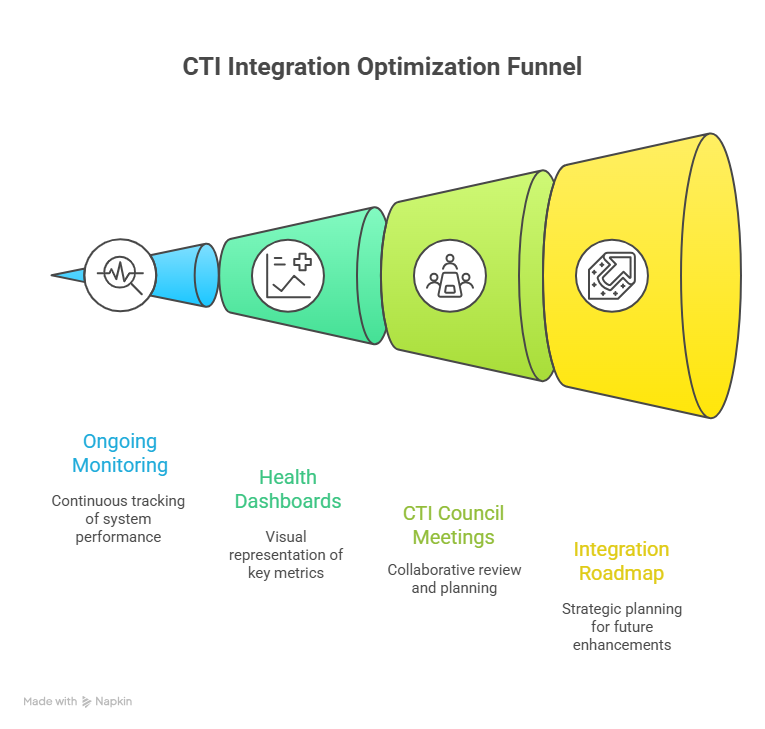
A CTI integration is never truly “done.” You need ongoing monitoring for latency, call volumes, error rates, and sync issues between Salesforce and your telephony layer. Set up health dashboards that track average screen-pop time, call logging success rate, and disposition completion, inspired by how advanced centers monitor uptime in downtime-free call environments.
Build a monthly or quarterly CTI council: Salesforce admin, telephony owner, RevOps, and QA. Review issues, enhancement requests, and new Salesforce features. Feed learnings back into your integration roadmap and keep documentation current. Over time, CTI becomes a strategic asset that powers your broader integration ecosystem, not just a dial tone inside Salesforce.