

CTI used to mean “click-to-call from the CRM.” In 2026, it’s the nervous system between your phone system and every workflow that touches a customer: routing, screen pops, logging, QA, billing, even AI coaching. When CTI is designed well, agents see the right record the moment a call connects, outcomes are logged without extra clicks, and leadership can finally trust reports that join calls, tickets, and revenue. When it’s rushed, you get duplicate contacts, broken dispositions, and a wall of angry reps who quietly switch back to their mobiles. This guide breaks CTI down into what it really is, how it works under the hood, and why so many “native integrations” fail in production.
1. What CTI Actually Is (and What It Isn’t)
Computer Telephony Integration is the layer that connects your cloud telephony or contact center platform with the systems where customer work actually lives: CRM, helpdesk, WFM, QA, and analytics. A good CTI layer keeps your call platform focused on routing, recording, and reliability, while letting tools like Salesforce, HubSpot, Zendesk, or your data warehouse consume those events in real time. That’s the model used in modern cloud call center software stacks instead of monolithic legacy PBX setups that tried to do everything themselves.
CTI is not just a widget in the corner of your CRM. It is a set of contracts: which system owns which object, who can create or update records, and how fast events must travel. When those contracts are explicit, CTI behaves predictably under load. When they’re implicit, a new queue, campaign, or integration silently corrupts data flows, and no one notices until reports diverge or compliance flags appear from DNC or consent violations, as described in deep-dive dialer compliance guides.
2. How CTI Works in a Modern Cloud Architecture
Most 2026 CTI architectures follow the same pattern: a cloud CCaaS or dialer emits events (call ringing, answered, wrap, recording stored); a CTI layer turns those into structured payloads; and downstream systems subscribe. In a Salesforce CTI deployment, that means a softphone in the utility bar, screen pops tied to phone fields, and call logs stored on leads, contacts, or cases, matching the blueprints you see in Salesforce CTI comparison guides. In a HubSpot setup, calls attach to contacts, deals, and tickets with minimal manual tagging.
The CCaaS platform should remain the single source of truth for raw telephony events. CRM and ticketing are consumers, not competitors. That’s why forward-looking teams pair flexible cloud telephony – capable of SIP trunking, IVR, and global routing like in global cloud PBX designs – with CTI connectors that know how to handle retries, rate limits, and partial failures. The heavy lifting happens in event queues and APIs, not in the UI.
3. CTI Use Cases That Actually Move Metrics
Well-designed CTI is visible in numbers, not just in UI demos. Screen pops that reliably open the correct Salesforce or HubSpot record reduce handle time and increase conversion because reps stop wasting the first 30–60 seconds asking for basic details. Click-to-call with automatic activity logging means managers can finally trust call volume reports, especially when layered on top of AI tooling that already trims manual labour. Post-call automations – status changes, follow-up tasks, ticket updates – keep pipelines honest without nagging agents.
CTI also lets you match routing and prioritisation to customer value. When your dialer respects lead scores and opportunity stages fed from CRM, predictive campaigns stop hammering low-value lists and start aligning with revenue, echoing the logic behind revenue-first auto dialer designs. On the service side, CTI-backed IVRs can route VIP callers to priority queues, auto-attach their cases, and trigger callbacks rather than leaving them in generic hold queues.
4. What Breaks in Real Life (and Why Teams Blame the Wrong Thing)
Most CTI failures are blamed on vendors when they’re really design issues. The first is identity mismatch: phone numbers stored in inconsistent formats across systems, leading to broken screen pops and duplicate contacts. The second is uncontrolled disposition sprawl – every team adds new outcomes, but no one maps them cleanly into CRM, so reports fragment. The third is latency: integrations that were never intended for real-time events get used as if they were, and agents see logs show up minutes later, not seconds, undermining confidence in the entire stack.
Compliance is another weak point. Dialers may honour TCPA or regional DNC lists, but custom CTI flows reintroduce risk by re-queuing excluded leads or bypassing consent checks. That’s why scaled outbound teams combine CTI with hardened compliance patterns similar to those in TCPA-aware US sales dialer setups. Finally, migrations from legacy on-prem PBX into cloud telephony often carry over assumptions that no longer apply – such as expecting line-based reporting instead of user or queue-based analytics – which causes integration confusion long after the phones are cut over.
5. Designing CTI That Survives Load, AI, and Future Channels
A survivable CTI design starts with clear boundaries. Telephony owns calls, queues, recordings, and dispositions. CRM owns customers, opportunities, and marketing consent. Helpdesk owns tickets, SLAs, and service history. WFM and QA own staffing, coverage, and quality metrics, increasingly backed by AI tooling like the ones that power 100% call coverage QA programs. Your architecture should reflect those boundaries, with integrations flowing along them – not crisscrossing randomly.
Versioning and observability matter as much as features. For each CTI integration, define schema versions, log failures centrally, and expose simple health checks so ops can tell if calls are flowing into CRM and tickets as expected. Use environments properly: dev, staging, and production should each have isolated CTI settings, especially for dialers and automations described in predictive dialing strategy guides. That way, experiments never quietly leak bad data into live revenue or compliance workflows.
6. Implementation Blueprints: Salesforce, HubSpot, Zendesk and Beyond
Salesforce CTI projects typically start with choosing between native adapters and vendor softphones. A disciplined blueprint maps which objects calls should attach to (lead, contact, account, opportunity, case) and how dispositions translate into fields, building on patterns discussed in Salesforce-native CTI solution guides. The best teams lock this down before inviting reps into the new UI, so metrics don’t fracture.
HubSpot CTI focuses more on pipeline visibility and attribution. Here, CTI should ensure every meaningful call is attached to contacts, companies, and deals, and that call outcomes trigger workflows, lists, and scoring rules as outlined in HubSpot call center integration playbooks. Zendesk CTI is about handle time and deflection: click-to-call from tickets, quick creation of new tickets from inbound numbers, and routing logic that sends high-severity calls to specialised queues, backed by the patterns in Zendesk integration blueprints. Across all of them, the principle is the same: decide what “good data” looks like before wiring the connector.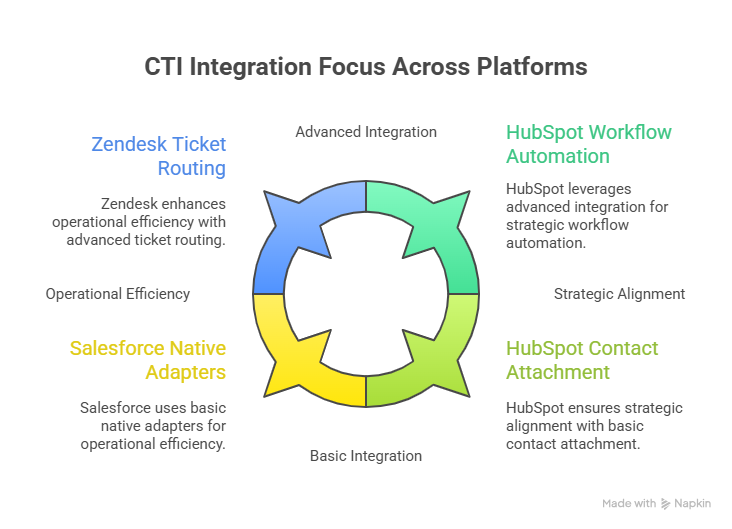
7. CTI, AI Coaching, and the Next Layer of Automation
Once CTI is stable, AI sits naturally on top of it. Real-time coaching tools listen to calls via the same telephony events CTI uses, then push suggestions, snippets, and warnings into the agent UI. Their effectiveness depends on the routing and data context underneath – you want AI to see the right customer record, ticket, and history, not duplicates. That’s why successful teams align CTI upgrades with the rollout of coaching engines similar to those described in real-time AI coaching guides.
On the analytics side, CTI ensures AI QA and call analytics tools receive clean, labelled data: which queue handled the call, which disposition was chosen, which product line was discussed. Call analytics for complex markets – multilingual GCC hubs, for example – depend on CTI getting language, region, and line-of-business mappings right upfront, echoing the design care you see in large-scale integration catalogues. When that foundation exists, AI becomes a multiplier instead of an expensive second reporting system that nobody fully trusts.






