Most teams do not lose minutes on calls. They lose them in the five seconds before and the thirty seconds after. Agents search three tabs for the right record, ask the same verification questions again, paste notes into the wrong field, then chase someone on Slack for context. Multiply that by thousands of interactions and you get bloated handle time that looks “normal” on dashboards. A tight VoIP + CRM integration cuts those invisible fragments. The phone system and the CRM stop being two tools and behave like one console, so agents see everything the second the call connects and can wrap in seconds, not minutes.
1. Why VoIP + CRM Is The Fastest Path To Lower Handle Time
A modern contact center runs on two cores. The voice core handles numbers, routing, IVR, recordings. The CRM core holds contacts, companies, tickets, and deals. If these are not integrated, every call is a mini investigation. Agents manually search names, confirm history, and rebuild context that already exists. When you bind an enterprise VoIP layer to CRM the right way, the call screen opens with the customer profile, recent cases, open quotes, and notes preloaded. That is the philosophy behind serious cloud call center platforms, not just simple softphones.
Handle time drops because everything non conversational is removed. No one asks for basic details you already verified last month. No one spends thirty seconds logging a call outcome after hanging up. Dispositions, follow up tasks, and next steps can be triggered from one click. Over hundreds of calls per agent each month, this is how teams reach the thirty to forty percent reduction that benchmark led operations report, similar to the gains seen when they move to global VoIP systems built for scale.
2. Where Handle Time Really Hides Before Integration
Most contact centers misdiagnose handle time. They focus on script length or agent speed, not the friction created by a fragmented stack. The biggest hidden delays are record search, authentication, navigation across tools, and manual wrap up. A rep may be fast on the phone, yet still waste half the interaction around the conversation. That is why VoIP and CRM must act like a single workspace, similar to how future facing stacks described in SIP to AI migration roadmaps treat telephony and data as one plane.
Start by observing a live floor. Count how often agents copy an identifier from the phone app into CRM search, ask callers to repeat information that should already be visible, or re type notes that could be captured automatically. None of this shows up as “waste” in traditional reports, yet it is often two to three minutes per interaction. Integration is not about adding a new feature. It is about removing repetitive motion from every single call so that your people only do work that needs their brain.
3. Integration Blueprint: How Top Teams Wire VoIP To CRM For Speed
Effective VoIP and CRM integration is not a single switch. It is a set of capabilities that work together. Use the blueprint below as a benchmark checklist. If your stack does not do most of this, your handle time ceiling will stay high, even if agents are excellent. Many of the strongest implementations borrow patterns from multi country VoIP deployments and from deep integration projects that treat voice as a data stream, not just audio.
VoIP + CRM Integration Capabilities That Cut Handle Time
| # |
Capability |
What The Agent Sees |
Handle Time Impact |
| 1 |
Automatic screen pop on inbound call |
Customer profile opens with history |
Removes search time at the start of every call |
| 2 |
Click to call from CRM records |
Dial directly from contact or ticket |
Cuts setup time for every outbound call |
| 3 |
Integrated call controls inside CRM |
Mute, transfer, hold next to fields |
No application switching during complex calls |
| 4 |
Auto creation of activities and tasks |
Call log and follow ups in one click |
Shrinks wrap time after each interaction |
| 5 |
Real time sync of call outcomes |
Disposition dropdown linked to fields |
Removes duplicate data entry and errors |
| 6 |
Embedded recordings and transcripts |
Playback inside the customer record |
Speeds up research on repeat or escalated calls |
| 7 |
Configurable data sync rules |
Only relevant fields shown to agents |
Reduces scrolling and information overload |
| 8 |
Queue and status sync with CRM teams |
Presence reflects availability everywhere |
Limits transfers to unavailable teammates |
| 9 |
Automatic ticket and case creation |
Cases open prefilled with call context |
Eliminates manual case setup during rush periods |
| 10 |
Region aware number routing |
Local numbers mapped to territories |
Improves first agent fit and reduces transfers |
| 11 |
Unified search across calls and records |
Find by caller, ticket, or order id |
Speeds escalation handling when customers call back |
| 12 |
Time line view of past interactions |
Email, chat, and calls in one feed |
Cuts explanation time for repeat issues |
| 13 |
Workflow triggers from call events |
Automations based on missed or long calls |
Handles follow ups without manual tracking |
| 14 |
Centralized metrics export |
AHT and volume mapped to CRM segments |
Lets you target improvements by segment, not guess |
| 15 |
Permission aware views |
Agents only see what they need |
Reduces confusion and time spent in the wrong records |
| 16 |
High availability VoIP backbone |
Calls stay stable during spikes |
Avoids retries and re explanations after drops |
| 17 |
Softphone support on any device |
Browser and mobile access for teams |
Keeps handle time consistent for remote agents |
| 18 |
Single sign on for phone and CRM |
One login, one identity |
Reduces login friction and agent downtime |
Review these capabilities against your current setup. Every missing row is hidden handle time you are paying for every day.
4. Real Benchmark Patterns: How Teams Actually Hit Forty Percent
Teams that report forty percent handle time reductions are not running gimmicks. They apply clean integration to specific workflows and measure hard. Typical patterns look like this. A support operation moves from legacy phone lines to a cloud architecture similar to zero downtime call designs, then binds that system to CRM with automatic ticket creation and AI summaries. First contact resolution rises because agents finally see every prior touch point in one place.
In outbound, a sales team replaces manual dialing with an integrated dialer that pulls segmented lists directly from CRM and writes outcomes back automatically, as structured in predictive dialing frameworks. Agents spend more time in live conversations and less in setup and notes. Across both uses, handle time drops in stages. Five to ten percent in the first month from screen pop and click to call, another ten to fifteen when workflows are tuned, and the remaining gains when AI and automation are layered correctly.
VoIP + CRM Integration Insights: Where Handle Time Quietly Moves
Most AHT gains come from faster navigation, not from rushing customers off the phone.
Architecture quality matters. If your VoIP core is unstable, integration only exposes more failure. Use patterns from
multi office VoIP blueprints.
Unstructured notes are handle time debt. Structured outcomes and workflows based on
integration heavy setups pay that debt down.
Agents trust integrated tools when they see accurate context in the first five seconds of every call.
Benchmarks without segments lie. Compare AHT by queue, region, and intent using frameworks from
modern metric sets.
AI without clean data only adds noise. Voice analytics and coaching need a stable VoIP plus CRM foundation first, like in
AI cost cutting deployments.
Handle time targets must respect complexity. Push simple resets lower and keep space for high value, multi step calls.
The best operations treat integration as an ongoing product, not a one time project.
Use these insights in your next quarterly review. If one feels uncomfortably true, that is your next integration sprint.
5. AI, Coaching, And Automation On Top Of The Integration
Once your VoIP and CRM cores behave like one system, AI can finally help instead of distracting. Real time coaching listens to the call, reads the customer record, and suggests next actions in context. This is what separates simple prompts from serious setups described in live AI coaching models. The AI already knows subscription level, renewal date, past complaints, and open tickets because CRM data is in the same view as the call.
On the automation side, every call event can drive a workflow. Long handle times in a queue can trigger alerts or temporary staffing changes. Missed calls can create tasks and outbound attempts tied to a specific owner. Repeated contacts on the same issue can automatically open a problem record. In advanced deployments, these events also shape dialing campaigns and routing logic, similar to the revenue led use cases outlined in auto dialer revenue playbooks. Handle time goes down not because people rush faster, but because process friction drops away.
6. Implementation Playbook: Ninety Days To Integrated, Faster Calls
A full integration does not need a multi year program. Most teams can reach meaningful results within three months if they follow a structured plan and choose a VoIP platform built for integrations, not just cheap minutes. Many pick designs similar to the ones used in global PBX and VoIP rollouts, then tie them into CRM step by step so they never lose visibility.
In the first thirty days, map flows, pick one or two priority queues, and deploy basic click to call and screen pop. Confirm that every call is logged correctly in CRM with the right owner and customer. In days thirty one to sixty, add structured dispositions, automatic ticket creation, and integrated recordings, then align reports with ROI ranked feature sets. In the final thirty days, switch on AI summaries, limited coaching, and a few targeted workflows. By the end, your agents should be working from a single console, and you should already see double digit handle time improvements in the most controlled queues.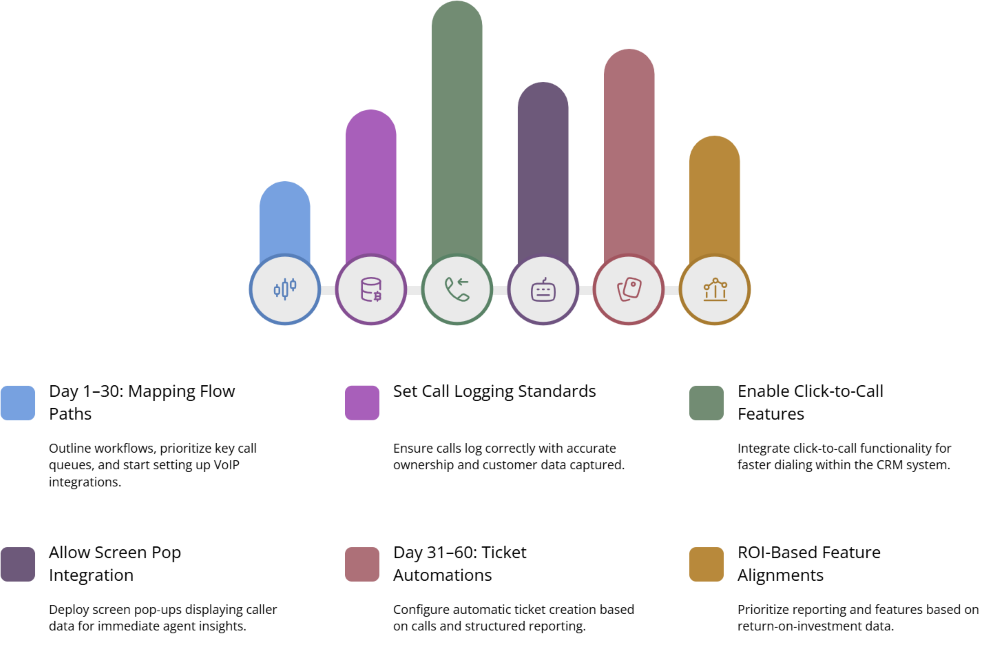
7. FAQs: VoIP + CRM Integrations and Handle Time
1) Our handle time is already “average.” Is VoIP + CRM integration still worth it?
“Average” usually means you carry the same inefficiencies as everyone else. Integrated VoIP and CRM remove a large part of that baseline waste. Even a ten to fifteen percent reduction in handle time translates into thousands of reclaimed hours per year when you multiply it by every agent and every queue. It also improves the experience customers feel, because less time is spent on verification, hunting for history, or repeating questions. This is why high performing operations treat integration as standard, just like they treat resilient architecture from zero lag call systems as non negotiable.
2) Will agents feel controlled if we log every call event into CRM?
Agents resist tools that create work or feel like surveillance. They adopt tools that make it easier to do a good job. When VoIP and CRM integrate properly, logging becomes lighter, not heavier. One click can record an outcome, create tasks, and attach notes. AI can generate summaries so agents only correct or add nuance. Coaching can focus on specific skills instead of manual compliance checks, as shown in AI first QA approaches. If you are transparent about how data is used and give agents visible benefits, they tend to embrace the change.
3) How do we decide which CRM fields are visible during a call?
Start with the shortest possible set of fields that lets an agent understand who they are speaking to and why. That usually includes customer type, product or plan, tenure, last interaction, and open tickets or deals. Additional fields like credit status or risk scores should only appear for teams that need them. Borrow ideas from lean designs used in downtime sensitive call center stacks, where every extra field is considered a potential distraction. If agents scroll during calls, the view is too dense. If they regularly ask customers for data already stored, you are hiding essential information.
4) Does every team need AI on top of VoIP + CRM, or is integration alone enough?
Integration delivers immediate value on its own and should be your first milestone. Screen pop, click to call, structured outcomes, and task automations solve most of the obvious handle time problems. AI adds a second layer of improvement through summaries, coaching, and insight generation. Teams with complex products, heavy regulatory requirements, or high call volumes gain the most from AI, similar to the high leverage scenarios described in AI coaching case studies. Think of AI as a force multiplier on top of clean integration rather than as a replacement.
5) How should we report on handle time after integrating VoIP and CRM?
Post integration, raw handle time by queue is not enough. You should look at average and median handle time by intent, customer segment, and channel. Tie that to outcome metrics from CRM such as first contact resolution, revenue per call, and retention. Build metric sets similar to those in advanced efficiency frameworks. The goal is not the lowest possible handle time. It is the best combination of speed and quality for each type of request. If complex cases stay thoughtful while simple resets drop sharply, your integration is doing exactly what it should.








