
If you’re comparing Five9, NICE inContact (CXone), Amazon Connect, and Talkdesk in 2025, you’re probably asking two questions: “Which one fits my stack?” and “Which one will actually move the needle on SLAs, CX, and cost?” All four are powerful, but they weren’t built for the same customers or the same operational realities. This guide strips away the sales decks and focuses on what matters: architecture, routing brains, AI depth, integrations, compliance posture, and what it’s really like to run a modern contact center on each platform.
1. The Right Way to Compare Five9, NICE, Amazon Connect, and Talkdesk
The mistake most teams make is treating this as a “feature checkbox” decision. In reality, you’re choosing an operations model. Five9 and NICE inContact are battle-tested enterprise clouds with deep WFO and complex routing built-in. Amazon Connect is an AWS-native toolkit for teams that want to assemble their own contact center brain. Talkdesk sits in the middle: a modern SaaS platform with strong AI and app ecosystem for fast-moving digital brands. Before you touch demos, write a one-page brief describing your channels, regions, integration needs, and whether you’re replacing a legacy PBX or already running on a cloud contact centre stack.
Use three lenses. First, time-to-value: how quickly you can go from contract to production across multiple queues and geographies. Second, change velocity: how easily you can tweak routing, add channels, or spin up new lines of business without opening a six-week IT ticket. Third, proof of ROI: whether the platform makes it easy to see exactly how AI, routing, and integrations are affecting AHT, FCR, and CSAT compared to your baseline.
2. Architecture & Reliability: How Each Platform Handles Scale
All four vendors market “global scale,” but the way they get there is very different. You care about three things: telephony footprint, failover design, and how much of the resilience you own versus how much is managed for you. If your current environment struggles with lag, jitter, or regional outages, this section should weigh heavily in your decision, on top of what you’ve already learned from zero-downtime architecture breakdowns.
From here, sanity-check your requirements. If you want something closer to “configure, not build,” focus on vendors that already deliver the cloud capabilities you see in modern hosted PBX platforms rather than starting with bare AWS primitives.
3. AI, Routing Intelligence, and Real-Time Coaching
AI is where marketing noise gets loudest. The real test is simple: does the platform improve who gets the call, what happens during the call, and how learnings feed back into the system? Five9 and NICE have mature AI suites focused on routing, analytics, and workforce optimization. Talkdesk leans into real-time guidance and self-service. Amazon Connect uses the broader AWS AI stack, which is powerful but requires in-house skills to wire together — comparable to how dedicated AI coaching engines sit on top of voice platforms.
Look for three capabilities. First, intent-aware routing that behaves like predictive engines discussed in advanced routing guides, not just simple skills routing. Second, real-time assist that surfaces suggestions, KB articles, and next-best actions inside the agent desktop without them having to search. Third, AI-native QA, where 100% of calls are auto-scored and flagged, rather than the old model of sampling 1–2% of interactions manually at the end of the week.
4. Integrations and Ecosystem: Salesforce, Zendesk, and Beyond
Your contact center is only as good as the systems it talks to. If your teams live in Salesforce, a deep CTI and screen-pop integration matters more than a slightly nicer IVR UI. Five9, NICE, Amazon Connect, and Talkdesk all offer Salesforce connectors, but depth varies: look closely at how they handle objects, omnichannel presence sync, and AI-powered recommendations. Use the same scrutiny you’d apply when evaluating a focused AI call center–Salesforce integration blueprint.
Beyond Salesforce, map your full ecosystem: Zendesk, HubSpot, ServiceNow, custom portals, billing, and internal tools. The best vendors offer prebuilt connectors for the majority of your stack and open APIs for the rest. That’s how teams achieve the integration density described in large-scale integrations catalogs instead of living in copy-paste hell. Pay attention to how each platform handles data ownership: where transcripts live, how long recordings are stored, and how AI summaries sync back into CRM records.
5. Compliance, Regions, and Data Residency
If you operate in banking, healthcare, or government, your number one question isn’t “Whose AI is cooler?” It’s “Can we prove compliance to regulators and enterprise security teams?” NICE and Five9 are strong options for heavily regulated environments, particularly when combined with region-specific data centers and encryption controls. Amazon Connect can be excellent for compliance if your security team already trusts your AWS configuration, similar to how some orgs use dedicated setups in Canada-grade compliant environments.
Think in three layers. First, data residency: can you keep recordings, logs, and analytics in-region (EU, UK, GCC, etc.) like you would expect from GDPR-proof deployments? Second, fine-grained access control: which roles can access which data and for how long? Third, compliance reporting: does the platform make it easy to prove adherence to PCI, GDPR, TCPA, or local dialer rules in a way your legal team accepts, taking inspiration from the detail level you see in modern TCPA compliance playbooks?
6. Analytics, QA, and Labor Cost Impact
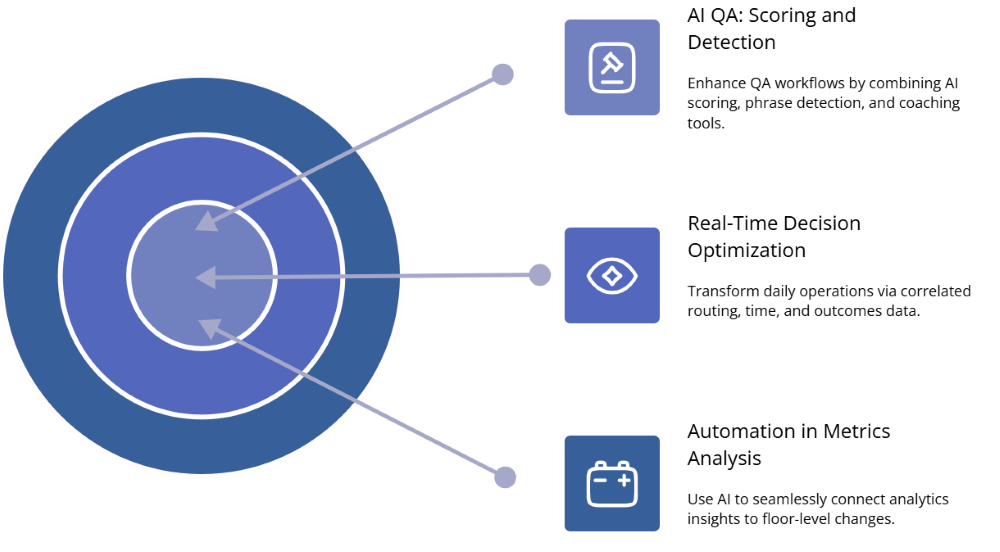
The biggest value unlock is turning your contact center from a black box into a real-time decision engine. All four vendors offer dashboards and reports, but there are meaningful differences in how easy it is to go from “numbers on a chart” to “changed behavior on the floor.” Look for automatic correlation between routing, handle time, and customer outcomes, not just wallboard-style metrics duplicated from your old system. Use a metrics framework similar to the one in modern efficiency benchmark guides to structure your evaluation.
On the QA side, prioritize platforms that combine AI scoring, phrase detection, and coaching workflows. That lets you cut the manual review volume described in AI-first QA case studies while increasing the percentage of calls touched. Pair that with labor-cost-focused AI (real-time assist, auto-summarization, smart wrap-up codes) like the cost-reduction approaches in AI labor cost toolkits, and you can justify the investment to finance with hard savings, not vague “innovation” language.
7. Cost, Contracts, and When to Consider Leaner Alternatives
Enterprise CCaaS pricing is rarely just “price per seat.” You’re looking at licenses, telephony, implementation, custom development, and ongoing change costs. Five9 and NICE often involve multi-year commitments and partner-heavy rollouts, which make sense for large organizations replacing aging infrastructure. Amazon Connect’s per-minute, per-feature economics can be attractive early on but require discipline to prevent cloud sprawl. Talkdesk frequently appeals to teams who want predictable CCaaS pricing with a faster ramp, similar in spirit to teams escaping the cost drag of legacy installations in PBX-to-VoIP cost-cutting stories.
Before you sign, build a “three-year total cost” model including migration and ongoing admin time. Then ask a harder question: “Do we need this level of complexity for every use case?” Many organizations use a heavyweight platform for their most complex lines of business while running regional, single-channel, or outbound-heavy teams on a simpler cloud stack that looks closer to a streamlined call center platform. This two-speed model gives you enterprise-grade capabilities where you truly need them, without turning every change request into a mini project.
8. Practical Selection Framework: Matching the Platform to Your Reality
Instead of asking “Which is best overall?” ask four more useful questions. First, “Who will own this day to day?” If your ops team wants to control routing, reporting, and experiments, bias toward platforms with strong admin UIs and shorter change cycles. Second, “How fast do we need to move?” If you’re also rolling out new geos and products, a long, complex implementation can slow your entire roadmap — which is why some teams choose incremental cloud migrations mirroring those in PBX migration roadmaps.
Third, “Where will AI actually pay off?” If your biggest problems are QA coverage, after-call work, and inconsistent coaching, prioritize platforms with ready-made AI for these jobs instead of general-purpose AI toys. Fourth, “What’s the exit plan?” No one likes to think about replatforming, but understanding your data export options, configuration portability, and ability to pilot alternative stacks (for example, in specific regions or brands) will protect you from getting boxed in if your needs evolve beyond what the big four deliver.
9. FAQs: Five9 vs NICE vs Amazon Connect vs Talkdesk in 2025
In the end, the “winner” is the platform that best matches your operational reality: your tech skills, your regulatory footprint, and how fast you need to ship new experiences. Use the big four to anchor your thinking — then stay open to leaner, more focused clouds that mirror the agility and clarity you see in modern AI-ready cloud call center deployments. That’s how you avoid turning a CCaaS decision into a multi-year drag on your CX roadmap, and instead turn it into a compounding advantage.






