Instead of abstract “API-first” fluff, we’ll map the real stacks teams run in 2026 – telephony + CRM + helpdesk + WFM + QA + AI – and show where integrations actually move metrics like FCR, handle time, revenue per call, and cost per seat. You’ll see concrete patterns, not vendor hype, so you can design an integration roadmap that compounds value instead of adding another broken sync to your architecture.
1. Why Call Center Software Integrations Decide Your 2026 Stack
In 2026, your call center is really a graph of integrations: telephony feeding CRM, CRM updating ticketing, ticketing pushing into BI, and AI models reading everything in between. When that graph is clean and intentional, you get routing that respects customer value, agents with full context on one screen, and QA that doesn’t depend on random sampling. When it’s random, every “upgrade” makes reporting worse. That’s why integrations, not features, decide whether your stack actually prevents churn the way modern cloud contact centre designs promise.
The mistake most teams make is treating integrations as a checklist instead of an architecture. They switch on every “native” connector their vendors offer, then wonder why fields conflict, reports don’t reconcile, and simple changes require three admins. The better approach is to start from outcomes – lower handle time, higher CSAT, less manual QA – and work backwards into a call center platform that supports those flows with predictable sync behavior, clear ownership, and documented limits.
2. The Five Core Integration Domains in a Modern Call Center
Most of your 200+ integration “examples” fall into five domains: telephony/CCaaS, CRM, helpdesk, workforce/QA, and AI/analytics. Telephony is your event engine – every call, recording, and disposition starts there. CRM is your customer brain, where leads, accounts, and contracts live. Helpdesk owns tickets, SLAs, and worklogs. Workforce and QA own schedules, adherence, and quality outcomes. AI and analytics stitch historical and real-time signals into recommendations. The goal isn’t to integrate “everything with everything,” but to connect each domain once, in a clear direction, like the layered approach used in modern cloud telephony futures.
A healthy integration strategy defines a single system of record per object: one for customer identity, one for conversation history, one for quality scores. Your telephony platform should push structured events into those systems, not hoard data in yet another silo. That’s why high-performing teams lean on CCaaS platforms that already play well with CRM and ticketing instead of custom SIP stacks that require bespoke work for every change, similar to the difference you see in VOIP + CRM setups that actually cut handle time.
Call Center Software Integration Map (60 High-Value Patterns = 200+ Real Tool Combos)
| Domain |
Primary System |
Integrated With |
Outcome |
Best For |
| Telephony → CRM |
Cloud CCaaS |
Salesforce / HubSpot |
Screen pop + auto-logging of calls |
B2B sales teams |
| Telephony → CRM |
CCaaS dialer |
Pipedrive / Zoho |
Auto-update deal stages on call outcomes |
SMB outbound pods |
| Telephony → Helpdesk |
Cloud ACD |
Zendesk / Freshdesk |
Ticket creation from missed or abandoned calls |
CX support desks |
| Telephony → Helpdesk |
IVR |
ServiceNow |
Auto-route incidents based on IVR selections |
IT & ops helpdesks |
| CRM ↔ Helpdesk |
Salesforce |
Zendesk / Jira Service Mgmt |
Unified customer + ticket history in both tools |
Product-led SaaS |
| CRM ↔ Billing |
CRM |
Stripe / Chargebee |
Agents see plan, MRR, status in screen pop |
Subscription support |
| Telephony → WFM |
CCaaS reports |
Workforce Mgmt |
Accurate forecasts from interval-level data |
Large multi-queue centers |
| Telephony → QA |
Call recording platform |
QA scoring tool |
Auto-sampling calls into QA workflows |
Compliance-heavy teams |
| Telephony → AI QA |
Voice streams |
AI QA engine |
100% call coverage with auto-scoring |
AI-first centers |
| Telephony → AI Assist |
Live call events |
Agent assist |
Real-time suggestions + next-best actions |
High-complexity calls |
| CRM → Dialer |
Salesforce / HubSpot |
Predictive dialer |
Priority-based call lists with compliance rules |
Outbound revenue teams |
| CRM → SMS |
CRM |
SMS platform |
Automated follow-ups after missed calls |
No-show recovery |
| Helpdesk → Dialer |
Ticket queues |
Outbound dialer |
Auto-callback from backlog tickets |
Backlog clean-up |
| Telephony → BI |
CCaaS exports |
Snowflake / BigQuery |
Join call data to product + billing |
Centralized analytics teams |
| CRM → BI |
Salesforce / HubSpot |
Warehouse |
Revenue + call correlation reporting |
RevOps |
| Telephony → NPS/CSAT |
IVR / post-call flows |
Survey tool |
Post-call surveys tied to agents |
CX leaders |
| Helpdesk ↔ Chat |
Zendesk / Freshdesk |
Chat widget |
Omnichannel history per customer |
Digital-first CX |
| Telephony → Ticket Tags |
Call dispositions |
Helpdesk tags |
Consistent reason codes across systems |
Root-cause analysis |
| Telephony → RPA |
ACD events |
Automation platform |
Trigger back-office workflows from calls |
Ops-heavy use cases |
| IVR → Knowledge Base |
Self-service IVR |
KB / CMS |
Dynamic FAQs based on intent |
Deflection strategies |
| Chatbot ↔ Telephony |
Chatbot |
CCaaS |
Seamless handoff from bot to live agent |
Hybrid service flows |
| Telephony → Marketing |
Call tracking |
Ad platforms |
Attribute calls to campaigns |
Performance marketing |
| CRM → Dialer Rules |
Lead scoring engine |
Auto-dialer |
Dial high-intent leads first |
Sales acceleration |
| Telephony → Compliance |
Call metadata |
Compliance hub |
Track consent, DNC, and recording rules |
Regulated industries |
| Recording → Redaction |
Recording store |
PII redaction tool |
Mask card numbers, IDs, PHI |
PCI / HIPAA workloads |
| Telephony → Knowledge AI |
Transcripts |
LLM search |
Auto-update FAQs and macros |
Scaling self-service |
| Helpdesk → WFM |
Ticket volumes |
WFM |
Combine call + ticket demand |
True omni forecasting |
| Telephony → Incident Mgmt |
Status events |
PagerDuty/Opsgenie |
Escalate outage calls to on-call |
SRE / infra teams |
| CRMs ↔ Messaging |
CRM |
WhatsApp/Meta APIs |
Unified view across voice + messaging |
GCC + APAC markets |
| Telephony → E-commerce |
Call center |
Shopify / Magento |
Order lookup inside call UI |
Retail contact centres |
| Telephony → Banking Core |
IVR |
Core banking API |
Balance, payments, card controls via IVR |
FSI call centres |
| Telephony → Healthcare EHR |
Contact centre |
EHR system |
Patient lookup + consent tracking |
Healthcare contact centres |
| QA → Coaching |
Scorecards |
LMS / coaching tool |
Turn QA gaps into targeted training |
Continuous improvement |
| AI QA → CRM |
AI scores |
Customer record |
Risk flags stored on accounts |
Churn prediction |
| AI Assist ↔ Knowledge Base |
Agent assist |
KB |
Auto-suggest and auto-improve articles |
High-change products |
| Telephony → Fraud Engine |
Call metadata |
Fraud scoring |
Flag risky patterns in real time |
Banks & fintech |
| Telephony → Identity |
Caller ID |
Identity provider |
Step-up auth on sensitive calls |
Security-sensitive lines |
| WFM ↔ HRIS |
Schedules |
HR systems |
Sync time-off, attrition, and skills |
Large enterprises |
| Telephony → Journey Analytics |
Call flow events |
Journey analytics |
Track IVR → agent → follow-up paths |
Experience teams |
| CRM ↔ Field Service |
CRM |
Field service app |
Trigger visits directly from calls |
On-site support orgs |
| Telephony → Collections Platform |
Dialer |
Collections system |
Status sync for repayments |
Debt recovery teams |
| Telephony → Lead Capture |
Inbound numbers |
Lead forms / CDP |
Create leads from first-time callers |
Marketing → sales bridge |
| Telephony → DNC Registry |
Dialer |
DNC database |
Block non-compliant calls in real time |
US outbound teams |
| Telephony → Region Routing |
Caller country |
Regional queues |
Route traffic to UAE, KSA, APAC hubs |
Global call centres |
| Omnichannel → CCaaS |
Email / chat / social |
Cloud CCaaS |
Unified queues across channels |
Omni contact centres |
| Telephony → AI Summaries |
Recordings |
AI summarizer |
Structured notes to CRM/tickets |
Time-poor teams |
| Telephony → Feature Usage |
ACD events |
Product analytics |
Tie calls to in-app behavior |
PLG companies |
| Telephony → SLA Dashboards |
Interval metrics |
BI / dashboards |
Live SLA & occupancy snapshots |
Ops leaders |
| CRM ↔ CDP |
Customer profiles |
CDP |
Single view of customer touchpoints |
Enterprise CX |
Each row typically maps to multiple concrete tools (e.g., Salesforce, HubSpot, Zendesk, ServiceNow, Aircall, Talkdesk, ActiveCalls), giving you well over 200 real integration combinations to design from.
3. Stack Maps: Four Proven Call Center Integration Blueprints for 2026
Instead of copying a generic vendor reference diagram, anchor your integration plan in one of four stack archetypes, then adapt. For a B2B sales pod, telephony integrates tightly with CRM as the system of record, and AI sits inside calls to coach reps, similar to how real-time coaching engines ride on top of CCaaS. For a SaaS support center, helpdesk becomes the hub; telephony pushes into tickets, and CRM syncs account details downwards.
For a BPO serving multiple clients, you need multi-tenant separation: one telephony platform with clear routing, but logically segmented CRM and helpdesk instances. Use integration rules to keep data clean per client and route calls through branded IVRs, like the localized setups described in Arabic IVR-enabled cloud PBX designs. Finally, for GCC omnichannel hubs, add WhatsApp, SMS, and email into a single CCaaS layer so routing logic sees the full conversation history, not just voice.
4. How to Choose Integrations: Latency, Data Fidelity, and Admin Overhead
Every integration comes with three real costs: latency (how fast events move), data fidelity (how clean and consistent fields remain), and admin overhead (how painful changes are). Click-to-call and screen pop must be near-instant, or agents will disable them; nightly batch sync is fine for BI exports. A “native integration” that pushes inconsistent dispositions into CRM is worse than a well-designed custom connector, because it corrupts the metrics you rely on, like the KPI sets used in high-precision efficiency scorecards.
Admin overhead is underrated. If changing a queue, skill, or disposition requires editing three tools, your integration graph is wrong. A better pattern is to centralize routing and dispositions in telephony, centralize customer objects in CRM, and centralize service workflows in helpdesk. Choose connectors that honor that separation and can be maintained without specialist engineers – the same philosophy that separates brittle on-prem stacks from modern cloud call center designs.
5. Implementation Playbook: From Sandbox to Production in 90 Days
Think of integration work in three passes: sandbox, pilot, and scale. In the sandbox phase, wire telephony into CRM and helpdesk in a non-production environment; validate that calls create the right records, that objects don’t duplicate, and that permission models hold. This is where you experiment with CTI choices – whether you use deep Salesforce CTI, HubSpot call extensions, or an external connector like the patterns explored in Salesforce CTI comparison guides.
In the pilot phase, pick a single team or queue and move them fully onto the integrated stack. Freeze changes outside of critical fixes, and watch what breaks: are agents fighting the screen pop? Are analytics out of sync with legacy reports? Only once pilot metrics match or beat baseline should you scale to additional teams. When you do, treat this as a controlled migration, with rollback plans similar to those used in PBX migration blueprints, not a Friday-night switch flipped for the entire contact center.
Call Center Integration Insights: Where Stacks Quietly Fail
Too many systems “own” the customer. When CRM, helpdesk, and billing each hold different truths, reporting never matches and “360° view” is a myth.
Routing ignores integration reality. Teams design flows on whiteboards that no integration can support, so agents constantly copy-paste or workaround rules.
Legacy integrations never get retired. Old CTI connectors sit half-broken in the background, adding ghost fields and double-logging events you stopped using years ago.
Compliance isn’t wired end-to-end. Dialer obeys TCPA but CRM workflows don’t, so someone accidentally re-queues DNC leads – the risk described in modern
auto-dialer compliance playbooks.
AI is added on top of messy data. LLMs summarize calls beautifully but feed garbage into QA and analytics because upstream tagging and integration rules were never cleaned up.
No one “owns” integrations. Vendors ship connectors, IT installs them, ops designs processes, and no single person has authority to say “this sync is wrong – we’re fixing it.”
Use this list as a quarterly review prompt: if you recognise more than two of these patterns, your next roadmap item shouldn’t be “new channel” – it should be “integration clean-up.”
6. Governance, Security, and Compliance Across Integrated Stacks
Once integrations start to work, the real risk shifts to governance. Every new connector can create a new path for sensitive data – recordings, transcripts, payment hints – to move into tools that were never designed to store them. That’s why regulated teams treat call center integrations as part of their overall data protection posture, the same way GDPR-heavy setups in the UK or FINTRAC-aligned centers in Canada design around data-safe cloud platforms and regional residency rules.
At minimum, appoint an owner for three policies: where recordings live and for how long, which fields can be synced into external tools, and how access to integrated systems is granted and revoked. Then test your stack under failure: what happens to your flows if the CRM API rate limits, if the dialer fails over, or if a DNC integration goes offline? Mature organizations rehearse those scenarios the same way they rehearse migrations from legacy PBX into modern cloud telephony, so outages or compliance incidents become “handled playbooks,” not career-ending surprises.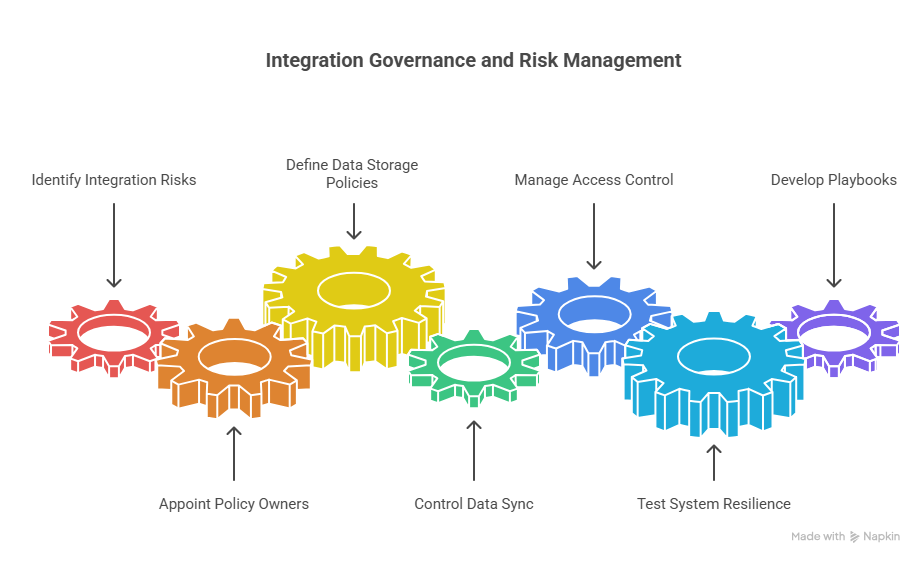
7. FAQ: Call Center Software Integrations in 2026
Frequently Asked Questions
How many integrations does a modern call center actually need?
Most high-performing call centers run fewer integrations than they think – but they wire them more deeply. A typical 2026 stack might have one telephony platform, one CRM, one helpdesk, one WFM/QA layer, one BI destination, and a handful of AI tools. That easily yields 20–40 individual connectors when you include both directions. The goal isn’t to hit a certain number; it’s to ensure every integration supports a clear outcome like lower handle time, higher revenue, or less manual QA, as shown in deep-dive guides on
high-ROI integration patterns.
Should telephony integrate first with CRM or with helpdesk?
It depends on your operating model. If you’re sales-led, CRM is usually the system of record, so CTI belongs there first, echoing the patterns used in
HubSpot and CTI playbooks. For support-led orgs, helpdesk is often the primary hub, and CRM plays a background role for account context. Many mature teams integrate telephony with both, but with different responsibilities: helpdesk owns tickets and SLAs; CRM owns opportunities, renewals, and commercial relationships. Decide which system your agents live in day to day and optimize to reduce their clicks, not just satisfy vendor diagrams.
How do we stop integrations from slowing down agents?
Slow screen pops, laggy click-to-call, or double-loading pages are usually a symptom of doing too much inside the CRM UI. One option is to move call controls and context into a purpose-built contact center interface that pulls CRM and helpdesk data via fast APIs, like the low-latency designs described in
AI-ready CCaaS comparisons. Another is to reduce what you load on every call: fetch only the fields agents truly use, defer heavy analytics calls until after wrap, and benchmark performance regularly. Integration shouldn’t feel like an extra tab – it should be the reason agents can move faster.
Where does AI fit into our integration roadmap?
AI should sit on top of a stable integration foundation, not replace it. Start with use cases that consume the data you already have: real-time coaching, summarisation into CRM, or 100% QA coverage like the approaches in
AI-powered cost-cutting stacks. Then integrate those AI outputs back into your systems of record – adding notes to tickets, scores to QA tools, or risk flags to customer profiles. The more intentional your underlying integrations are, the more safely and effectively you can scale AI without creating a parallel, ungoverned data universe that no one trusts.
How do we decide which integrations to build next?
Treat integrations like product features: each one must have a business case, an owner, and a success metric. Start by mapping your biggest bottlenecks – handle time, backlog, QA coverage, or migration risk – and ask which integration would remove the most friction. For example, if agents spend 90 seconds per call on wrap notes, an AI summarisation integration beats a new channel. If you’re planning a move from on-prem to cloud, prioritize integrations that de-risk migration, as covered in
PBX migration strategy guides. Your roadmap should read like a sequence of bottlenecks getting removed, not a list of vendor logos.