Zendesk is where a lot of teams start their “omnichannel” journey — email, chat, WhatsApp, voice, social, all in one place. But the real differentiator in 2025 isn’t whether you own Zendesk; it’s whether your call center stack, AI tools, and external systems are wired into it properly. The right integrations turn Zendesk into an always-on command center: agents see full context, AI can coach in real time, and leaders get clean, cross-channel data. The wrong ones leave you with tabs, hacks, and manual exports. This guide breaks down a practical way to choose, design, and roll out the best Zendesk call center integrations for AI and omnichannel — without drowning your team in complexity.
1. Why Zendesk Integrations Decide If Your Omnichannel Strategy Actually Works
Zendesk on its own is a strong ticketing and messaging hub, but customers never think in “tickets.” They think in journeys: they saw an ad, clicked an email, started a chat, got a call, replied on WhatsApp. If your call center platform and phone system don’t feed into Zendesk in real time, every agent is basically guessing. That’s why high-performing teams treat Zendesk as the front-end and plug in a cloud call center stack built for deep integration, not as a standalone softphone sitting in a browser tab.
Done properly, every inbound call pops the right Zendesk ticket or user profile; every outbound attempt is synced to conversation history; and every AI summary or QA score lands where supervisors already live. Instead of juggling multiple dashboards, they live in Zendesk and still enjoy the reliability and routing sophistication of serious telephony designed to minimize downtime and call loss. That’s the standard you should be judging integrations against.
2. Evaluation Framework: AI Depth, Channel Coverage, and Operational Load
There are hundreds of potential plug-ins, apps, and “connectors” for Zendesk. To avoid paralysis, score them on three axes: AI depth, channel coverage, and operational load. AI depth is how far a tool goes beyond basic logging: does it provide in-call coaching, auto-summarization, QA scoring, and intent tagging similar to the advanced packs found in integration-heavy call center environments? Channel coverage looks at whether an integration unifies email, voice, SMS, WhatsApp, and social in a coherent way instead of adding another silo.
Operational load is the hidden killer. Every new integration adds configuration, training, and maintenance overhead. A “perfect” app that creates three new dashboards nobody opens is worse than a simple connector that makes Zendesk agents 15% faster at handling calls. When in doubt, prioritise integrations that improve what your team already does all day — picking up calls, replying to tickets, and escalating tricky cases — rather than chasing impressive but rarely used features.
3. Best Zendesk Call Center Integration Patterns for 2025 (AI + Omnichannel Table)
Instead of chasing logos, focus on integration patterns — the ways you connect voice, channels, data, and AI around Zendesk. Use the table below as a menu of patterns to adopt, regardless of specific vendor names.
Best Zendesk Call Center Integration Patterns for 2025-2026 — AI + Omnichannel Lens
“““
| # |
Integration Pattern |
Primary Channels |
AI / Automation Upside |
When to Prioritize |
| 1 |
Cloud voice platform + Zendesk Talk replacement/extension |
Voice, IVR, call recording |
Better routing, uptime, and AI-ready audio streams. |
Scaling beyond basic talk usage or multi-region support. |
| 2 |
WhatsApp Business API integrated to Zendesk messaging |
WhatsApp, templates, rich media |
AI bots can triage and tag before agents step in. |
Emerging markets, GCC, or customer bases that live on WhatsApp. |
| 3 |
SMS provider connected for alerts and callbacks |
SMS, voice callbacks |
Automated reminders, OTP flows, and proactive outreach. |
No-show reduction, payment reminders, delivery updates. |
| 4 |
E-commerce platform (Shopify, etc.) app in Zendesk sidebar |
Voice, chat, email with order data |
AI can reference order history in real-time suggestions. |
High-volume online stores needing fast order lookups. |
| 5 |
Payment gateway integration for in-call transactions |
Voice, secure payment links |
Automated payment link generation from macros. |
Upsells, renewals, and one-call resolution for billing issues. |
| 6 |
Customer data platform sync into Zendesk profiles |
All channels enriched |
AI uses unified traits to personalize offers and tone. |
Brands with fragmented data across tools. |
| 7 |
Zendesk–Sales CRM bridge (Salesforce, HubSpot, etc.) |
Voice + email + deals |
Lead/opp updates auto-trigger from support conversations. |
When success and sales both touch the same accounts. |
| 8 |
Social channels (Facebook, Instagram, X) into Zendesk |
Social DMs, comments |
Sentiment and topic models across public + private threads. |
Consumer brands with high social support volume. |
| 9 |
AI transcription + summarisation on all recorded calls |
Voice |
Instant notes, tags, and suggested macros after each call. |
Teams drowning in manual note-taking and QA work. |
| 10 |
Real-time AI agent assist inside Zendesk workspace |
Voice, chat, messaging |
Live suggestions, knowledge surfacing, objection handling. |
New agents, complex products, or regulated scripts. |
| 11 |
AI QA platform reading transcripts + Zendesk data |
Voice, chat |
Scores every conversation, flags outliers for review. |
When QA sampling can’t keep up with volume. |
| 12 |
Workforce management / scheduling system integration |
All live channels |
Forecasting and staffing aligned with ticket and call patterns. |
Multi-queue, multi-region service desks. |
| 13 |
Voice-of-customer (survey/NPS/CSAT) tied to tickets |
Email, SMS, in-app |
Correlate scores with call behavior for coaching. |
Any team serious about retention and loyalty. |
| 14 |
Knowledge base + suggestion engine in agent workspace |
Voice, chat, email |
Faster answers, auto-linked articles, deflection insights. |
Complex products with many edge cases. |
| 15 |
Bot platform handling Level 0/1 then handing off to agents |
Chat, messaging, web |
Triage, FAQs, and routing before human involvement. |
Teams flooded with repeat “how do I” questions. |
| 16 |
Screen pop of customer 360 on inbound call in Zendesk |
Voice |
Shorter handle time and better personalization. |
When agents bounce through multiple tools per call. |
| 17 |
Outbound dialer integration sourcing lists from Zendesk |
Voice, SMS |
Campaign-based outreach with full conversation history. |
Renewals, win-back campaigns, proactive success. |
| 18 |
Routing based on language and skills tags in profiles |
Voice, chat, messaging |
Higher FCR, fewer transfers, more relevant responses. |
Multilingual operations, GCC and APAC especially. |
| 19 |
Analytics / BI export combining Zendesk + call data |
All channels |
Deeper reporting, cohort analysis, and root cause work. |
When leadership wants unified CX and call views. |
| 20 |
Status sync between call center app and Zendesk |
Voice, chat |
Single source of truth for availability and occupancy. |
Blended operations juggling multiple channels. |
| 21 |
Escalation workflows into specialist teams or external tools |
Voice, email, chat |
Faster resolution of complex technical or billing issues. |
When L1 needs structured paths to L2/L3. |
| 22 |
Quality management notes attached to tickets and calls |
Voice, chat |
Coaching insights are visible in the tools agents use. |
Teams that want QA to actually change behavior. |
| 23 |
IVR path mapped into custom Zendesk fields |
Voice |
Better intent analytics and self-service optimisation. |
Any operation investing in smarter routing. |
| 24 |
Real-time wallboards showing Zendesk + voice queues |
Voice, chat, messaging |
Supervisors act on live backlog and SLA risks. |
NOC-style operations or large-volume support hubs. |
| 25 |
Zendesk + multi-region cloud telephony for follow-the-sun |
Voice, messaging |
Lower latency, local numbers, region-aware AI models. |
Global brands serving 24/7 audiences across time zones. |
You don’t need all 25 patterns from day one. Start with voice + AI basics, then layer in channels and automation where they clearly reduce handle time or unlock new revenue/satisfaction.
4. AI Coaching, QA, and Workforce Intelligence on Top of Zendesk
The real unlock for Zendesk call centers in 2025 is AI that lives in the agent’s workflow instead of in separate dashboards. Real-time guidance engines can sit next to the Zendesk conversation view, listening to calls, chats, and WhatsApp threads and suggesting next-best replies. Think of the same coaching philosophy used in real-time AI call coaching platforms, but mapped to Zendesk macros, SLAs, and internal policies. New agents ramp faster; experienced agents make fewer mistakes on complex calls.
On the back end, AI QA systems read transcripts and ticket data to score conversations for empathy, accuracy, and compliance. Instead of reviewing random 2% samples, QA managers can review the 5–10% most risky or impactful interactions. The best setups look similar to AI-first QA programs that audit 100% of calls, but slot the results directly into Zendesk views and custom fields. That way, supervisors coach inside the same platform where work happens, and AI scores become part of everyday triage, not a side project.
Zendesk Integration Insights: Where Teams Quietly Win or Lose
“One more app” fatigue is real. The best integrations replace steps, not add new ones.
Voice quality still matters more than flashy AI. Use a backbone built like a
global VoIP/PBX network, not a fragile plugin.
AI coaching works best when integrated with real playbooks and macros, not generic suggestions.
The most successful teams treat Zendesk as the UI layer over an integration-friendly call center core.
Metrics should be shared across tools. Pulling voice and ticket data together, like in
advanced metric frameworks, stops channel conflicts.
Routing decisions belong in your core telephony, but should reflect Zendesk fields and tags.
If an integration doesn’t change what agents or supervisors do in Zendesk, it’s probably not worth the overhead.
Use this panel as a quick smell test whenever a new app or integration is suggested. If it doesn’t clearly impact these levers, think twice.
5. Omnichannel Routing, Use Cases, and Metrics Inside Zendesk
Zendesk’s power is that it already knows which customer is talking to you and on which channel. The missing piece in many setups is routing logic and KPI design that respect that context. Voice, chat, and messaging queues should be informed by tags like language, segment, product, and risk level — the same discipline used in industry-specific cloud call center deployments. When routing is aligned, agents stop bouncing customers between queues and start owning journeys end-to-end.
On the metrics side, leaders need a unified dashboard tying ticket metrics (backlog, first reply, full resolution) to call center KPIs like service level, average handle time, and occupancy. You don’t need to invent new formulas; borrow from the metric sets used in ROI-ranked feature and KPI frameworks and adapt them for Zendesk. The goal is simple: be able to answer “which integrations and channels are actually moving NPS, churn, and revenue” instead of just counting total conversations.
6. Implementation Playbook: Rolling Out Zendesk Integrations Without Breaking Ops
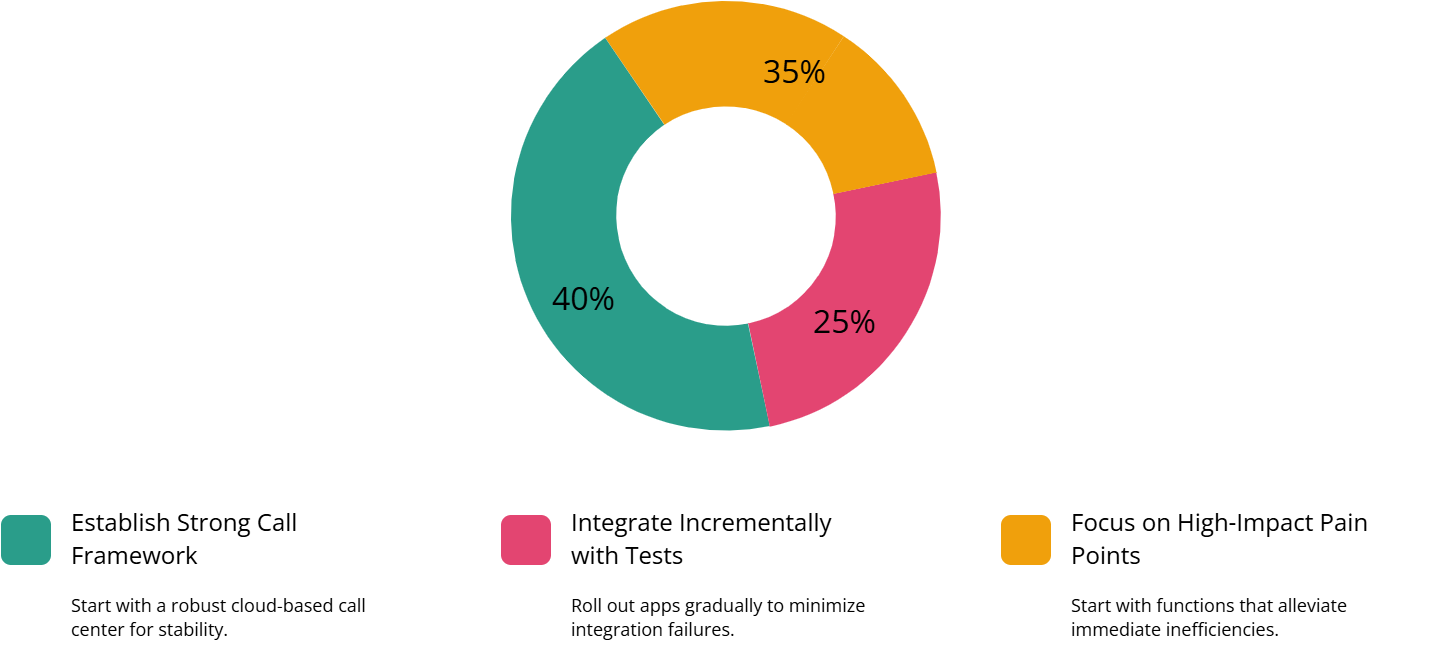
The fastest way to tank a Zendesk integration project is to turn on ten apps at once and hope for the best. High-performing teams treat platform work the way they treat telephony architecture: phase-driven, tested, and reversible. Start with your voice backbone — a cloud call center platform built for stability and multi-region routing, similar in design ethos to zero-lag architectures. Connect that into Zendesk and prove that inbound pop, outbound sync, and recording links work cleanly.
Next, layer in AI and channels where they directly fix pain. If agents are switching tools to place calls, solve that first. If leaders have no visibility into omnichannel queues, add reporting exports or BI integration. For global or remote teams, test connectivity with patterns borrowed from multi-office VoIP deployments. Save heavy-lift items (like deep CRM bridging or fully custom bots) for later phases, once the basics are stable and the team trusts the new workflows.
Finally, resist the urge to treat Zendesk as your only reference architecture. Look at how your org is building AI and integration-heavy environments elsewhere — for instance, deeper CRM-led designs like Salesforce-native AI call center stacks or telephony roadmaps that move teams from SIP to AI-first voice systems. The underlying principles are the same: clean events, stable connectivity, and clear ownership of data.
7. Zendesk Call Center Integrations FAQs (AI + Omnichannel)
1) Do we really need a separate cloud call center platform if we already use Zendesk Talk?
It depends on scale and complexity. For small teams, Zendesk Talk may be enough. But once you need multi-region routing, advanced IVR, predictive or progressive dialing, and serious uptime guarantees, it’s usually better to put Zendesk on top of a purpose-built voice core — the same way enterprise teams adopt cloud contact center platforms that focus on reliability and churn prevention. Zendesk stays the agent desktop; the call center platform handles routing, resilience, and AI-ready audio.
2) What’s the quickest Zendesk integration win for AI-powered call centers?
The fastest win is usually turning on AI transcription + summarisation + auto-logging for calls, then surfacing that directly inside Zendesk tickets. Within weeks, you cut wrap-up time, improve documentation, and give QA and product teams clean data to work with. This is the same pattern that underpins many high-ROI integration bundles: start where you save agents time on every single conversation, then layer in more advanced AI and routing.
3) How do we stop Zendesk integrations from turning into a maintenance nightmare?
Treat integrations like products, not experiments. Give each major integration (voice core, AI QA, WFM, messaging) an owner, a roadmap, and clear success metrics. Avoid overlapping apps that do the same job. Whenever you consider a new connector, ask what it replaces — not just what it adds. The most stable stacks use a small number of platforms wired together cleanly, similar to how disciplined teams plan PBX and VoIP cost-cutting architectures instead of adding random point solutions.
4) Where does omnichannel routing logic actually live — Zendesk or the call center platform?
Think of Zendesk as the brain for customer context and the call center platform as the muscle for execution. Zendesk stores tags, segments, and intent; the voice platform uses that to decide skills, queues, and failover, borrowing ideas from predictive routing playbooks. For digital channels, Zendesk’s own routing rules can handle much of the work. The goal is consistent logic: a high-value customer should feel prioritized whether they call, chat, or WhatsApp — the tech stack just needs to reflect that policy.
5) How do we future-proof our Zendesk stack for new channels and AI updates?
Future-proofing is less about predicting the next channel and more about choosing integration-friendly building blocks. A telephony core that already supports global routing and API-first design, like those used in multi-country remote voice setups, makes it easier to add new regions and channels later. On the AI side, prefer tools that expose their data and decisions through APIs and standard fields in Zendesk. That way you can swap models or add new AI vendors without ripping out your entire agent experience.