Aircall earned its place as a go-to cloud phone for fast-moving teams: easy setup, clean UI, and simple pricing. But once you hit serious volume, stricter compliance, or complex routing needs, its strengths can become ceilings. You start bumping into limits around recording policies, reporting depth, and how far you can push routing, AI, and regional telephony. This guide breaks down when Aircall is still a great fit, when it quietly holds you back, and which alternative architectures make more sense if you care about compliance, routing intelligence, and analytics that can stand in front of a CFO or regulator.
1. Where Aircall Works – And Where It Starts to Hurt
Aircall shines for small to mid-sized teams who need to get calling live quickly: outbound SDR pods, lean support desks, and distributed SMBs. Its strengths lie in easy onboarding and a light admin surface. If you’re just leaving spreadsheets and personal mobiles, it can feel like a huge upgrade compared to the first generation of legacy tools that cloud platforms like modern contact center stacks replaced.
The friction starts when you add stricter compliance, advanced routing, or heavy analytics expectations. Teams running regulated campaigns, global queues, or multi-region operations often find limits in how granularly they can segment recording, data residency, or queue-level reporting. At that point, the overhead of workarounds — manual exports, third-party add-ons, duplicated flows — starts to erode the simplicity that justified the choice in the first place.
2. The Evaluation Framework: What “Better Than Aircall” Really Means
When you say you want an “Aircall alternative,” what you usually mean is: “I want everything that’s good about Aircall, plus a set of capabilities it will never prioritize.” Those capabilities tend to cluster in six areas: telephony depth, routing intelligence, compliance posture, integration maturity, AI coverage, and long-term TCO. Frameworks like ROI-ranked feature lists are useful lenses here — they show which features actually move revenue or cost curves.
Start by scoring your current stack: how confident are you in uptime, audio quality, and failover? Could you explain your recording and masking posture to a regulator? How clean and complete is your data in CRM or data warehouse? How much labor is tied up in after-call work that could be automated, as mapped in AI labor-cutting playbooks? Once you quantify these gaps, you’ll see whether you need an enterprise CCaaS, an AI-first alternative, or a deeper CTI layer rather than just “another phone app.”
3. Archetype 1: Compliance-First Enterprise CCaaS
For enterprises with regulators in the room — banking, insurance, healthcare, collections — the right alternative to Aircall is almost always a compliance-first CCaaS. These platforms treat recording policies, consent flows, encryption, and role-based access as first-class citizens. They resemble the architectures used in regulated markets, such as data-compliant Canadian contact centers, where reliability and auditable controls are non-negotiable.
Expect more complex configuration, but also more control: granular recording toggles by queue and campaign, masking of PCI data, IP allowlisting, advanced SSO, and exportable audit logs. This is overkill for early-stage teams, but it’s the only sane option if you’re signing multi-year contracts with enterprises that ask for security questionnaires, data flow diagrams, and business continuity plans modeled on formal migration blueprints.
4. Archetype 2: AI-First, Labor-Reducing Alternatives
Another group outgrows Aircall not because of compliance, but because of labor math. Once you see how much time your team spends on wrap-up notes, QA sampling, and manual coaching, it’s hard to unsee it. AI-first alternatives bake in real-time coaching, auto-summarization, and 100% QA coverage so you can reassign hours to higher-leverage work, similar to the outcomes mapped in AI QA automation frameworks.
These platforms operate more like an intelligence layer than a simple phone. They stream calls to transcription, score them for sentiment and compliance, and surface coaching prompts live — the same pattern you’ll find in real-time agent coaching setups. If your primary constraint is headcount or burnout, not telco minutiae, this category is often the most powerful upgrade, especially when combined with dialer strategies that replace manual dialing entirely.
5. Archetype 3: Deep CTI for Salesforce, HubSpot, and Zendesk
Some teams don’t need a whole new contact center; they need their calls to live properly inside Salesforce, HubSpot, or Zendesk. If sales or support already lives in your CRM or helpdesk, the best “alternative” to Aircall is often a deeper CTI integration that turns that system into the single pane of glass. That means screen pops, click-to-call, outcome logging, and reporting are native — not stitched together by webhooks and copy-paste.
Evaluation here is about integration depth, not generic feature lists. For Salesforce, use comparison guides such as CTI benchmarks for speed and compliance to see which vendors keep latency low and handle complex objects gracefully. For HubSpot-centric teams, look for routing, coaching, and reporting designs similar to those in HubSpot call center playbooks. Zendesk-heavy support desks should prioritize omnichannel history and SLA-aware voice behavior like the patterns documented in modern Zendesk integration guides.
6. Archetype 4: GCC and Multilingual Operations (Arabic IVR, Regional Routing)
Aircall is built with global teams in mind, but GCC operations — UAE, KSA, Qatar, Bahrain, Kuwait — add extra complexity: Arabic IVR, multilingual agents, local numbering, and sometimes data residency demands. Alternatives built with this landscape in mind ship with features like right-to-left IVRs, dual-language prompts, and nuanced toll-free and DID support that look a lot like UAE-focused cloud PBX setups.
In this archetype, you also care about how well the platform handles regional compliance and AI accuracy in Arabic. Solutions that pair region-aware telephony with multilingual transcription and analytics, like the patterns explored in Arabic AI analytics guides, give GCC buyers a far stronger foundation than a generic global CCaaS. If your growth markets sit across GCC and nearby time zones, this category is often more valuable than staying on a US- or EU-centric stack.
7. Migration Playbook: Moving Off Aircall Without Breaking Anything
The worst way to leave Aircall is a big-bang cutover with unclear success criteria. Instead, treat migration like a PBX-to-cloud project in miniature. Start by inventorying queues, numbers, integrations, and reporting dependencies, just like you would in a full telephony migration survival plan. Decide which business units move first (for example, one outbound team plus one support queue) and port only the numbers they own.
Run both systems in parallel for a defined pilot period: calls land on the new platform, but you keep Aircall as a safety net in case metrics drift badly. Validate AHT, connect rate, SLA, and QA scores weekly using repeatable scorecards like those in modern QA frameworks. Only once those stabilize, move remaining queues and decommission Aircall. Resist the temptation to redesign every workflow mid-migration; capture improvement ideas and roll them out in a second phase after stability is proven.
8. Matching Alternatives to Real-World Scenarios
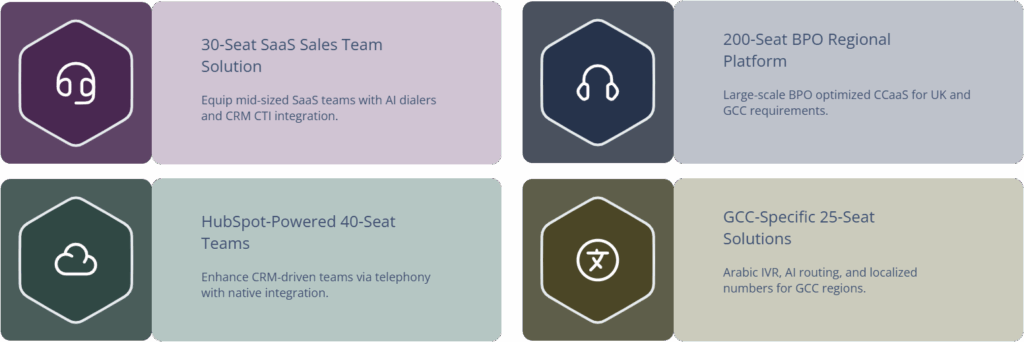
If you’re still unsure which archetype fits, anchor on concrete scenarios rather than abstract pros and cons. A 30-seat SaaS sales team that has outgrown manual dialing is usually better served by an AI-powered dialer and agent assist stack, paired with CRM CTI, similar to the architectures in predictive dialing setups. A 200-seat BPO handling UK and GCC clients may favor enterprise CCaaS tuned for regional requirements instead.
Meanwhile, a 40-seat success and support team with deep HubSpot adoption might get the most value from staying inside their CRM and plugging in a telephony provider that behaves like a native extension, following patterns from HubSpot + call center integration guides. And a 25-seat customer service team in Dubai or Riyadh could unlock the most value by moving to a GCC-optimized platform that combines Arabic IVR, AI routing, and regional numbers, as seen in UAE-focused software reviews.